Results
SEBI Grade A (Assistant Manager-135 Posts) Result 2026 Released, Check Now
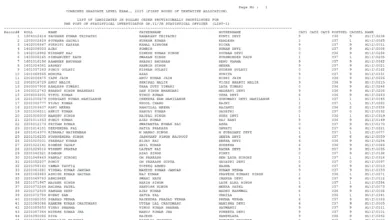
SEBI Grade A Result 2026: The Securities and Exchange Board of India (SEBI) has released the Phase-I Score Card on its official website for the recruitment of Assistant Manager Grade A posts in various streams including General, Legal, Law, Electrical Engineering, Civil Engineering, Research, and Official Language.
The Phase-I examination was held on 10 January 2026. The online application process began on 30 October 2025 and remained open till November 2025. Candidates who appeared for the exam are advised to check the complete details related to the SEBI Assistant Manager Grade A Phase-I Score Card 2026 on the official website.
SEBI Grade A Recruitment 2025 Overview
| Organization Name | Securities and Exchange Board of India (SEBI) |
| Post Name | Officer Grade A (Assistant Manager) |
| Job Location | All India |
| Vacancies | 135 Posts |
| Job Type | Permanent |
| Category | SEBI Grade A Result 2026 |
| Official Website | www.sebi.gov.in |
SEBI Grade A Recruitment 2025 Important Dates
- Application Start Date: 30 October 2025
- Last Date to Apply: 28 November 2025 (till 11:59 PM)
- Fee Payment Last Date: 28 November 2025
- Phase-I Admit Card Date: 03 January 2026
- Phase-I Examination: 10 January 2026
- Phase-I Result Date: 30 January 2026
- Phase-I Score Card: 04 February 2026
- Phase-II Admit Card Date: 12 February 2026
- Phase-II Examination: 21 February 2026
- Phase-II Result Date: 27 March 2026
SEBI Grade A Recruitment 2025 Application Fees
- General / OBC / EWS: ₹1180/-
- SC / ST / PH: ₹118/-
- Payment Mode: Online
SEBI Grade A Recruitment 2025 Age Limit Details
- Maximum Age: 30 years
- Age as on: 30/09/2025
- Born on or after: 01/10/1995
- Age relaxation applicable as per government rules
SEBI Grade A Recruitment 2025 Educational Qualification
- General: B.Tech / LLB / PG in any stream / CA
- Legal: Bachelor’s Degree in Law
- Information Technology: B.Tech / PG in Computer Science / IT
- Engineering (Electrical): B.Tech in Electrical Engineering
- Engineering (Civil): B.Tech in Civil Engineering
- Research: Post Graduate in a related field
- Official Language: PG Degree in Hindi / English
SEBI Grade A Recruitment 2025 Vacancy Total : 135 Posts
| Stream | Vacancies |
|---|---|
| General | 77 |
| Legal | 20 |
| Information Technology | 22 |
| Research | 08 |
| Official Language | 03 |
| Engineering (Electrical) | 02 |
| Engineering (Civil) | 03 |
SEBI Grade A Recruitment 2025 Pay and Allowances
- Pay Scale (Grade A Officers): ₹62,500 – 3600 (4) – 76,900 – 4050 (7) – 1,05,250 – EB – 4050 (4) – 1,21,450 – 4650 (1) – 1,26,100 [17 years]
- Gross Emoluments at Mumbai (minimum of scale):
- Approx. ₹1,84,000/- p.m. without accommodation
- Approx. ₹1,43,000/- p.m. with accommodation
- Additional Benefits: Leave Fare Concession, Medical Expenses, Eye Refraction, Education Allowance, Knowledge Updation Allowance, Briefcase, Conveyance Expenses, House Cleaning Allowance, Staff Furnishing Scheme, Scheme for Purchasing Computers, Subsidized Lunch Facility, and other admissible benefits.
SEBI Grade A Recruitment 2025 Selection Process
The selection process may include:
- Prelims Written Exam
- Mains Written Exam
- Personal Interview
- Document Verification
- Medical Examination
SEBI Grade A Recruitment 2025 Download Result PDF
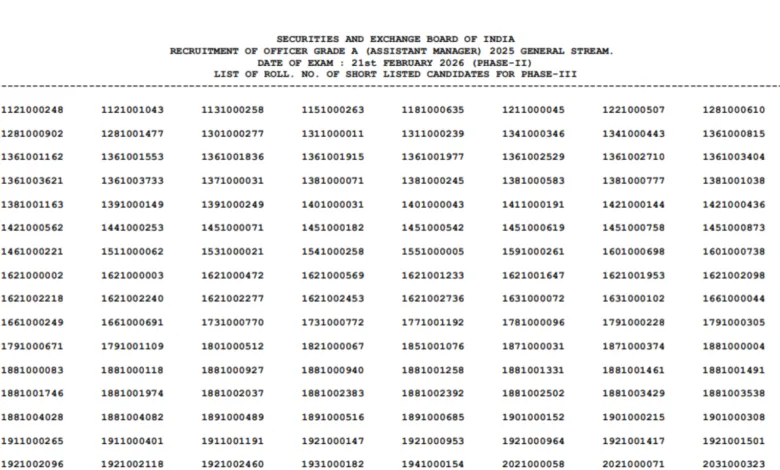
| Download Phase-II Result | Click Here |
| Download Phase-I Score Card | Click Here |
| Download Phase-I Result | Click Here |
| Download Exam Admit Card | Click Here |
| Notification PDF | Click Here |
How to Check & Download SEBI Grade A Result 2026
- Open any internet browser on your mobile phone or computer.
- Visit the official website of the Securities and Exchange Board of India (SEBI).
- On the homepage, click on the Recruitment / Results / Careers section.
- Find the link related to Assistant Manager (Grade A) Phase-I Score Card 2026.
- Click on the notification to open the result PDF or the login page.
- If the result is available in PDF format, scroll the page or use Ctrl + F to search your roll number.
- If a login page opens, enter your registration number or roll number and date of birth or password.
- After submitting the details, your result status will be displayed on the screen.
- Download the score card or result PDF and save it on your device.
- Take a printout for future reference and for the next stages of selection.